TrainFlow's AI Coach is a running coach built into the app. It builds and adapts weekly training plans based on an athlete's stated preferences, their actual training results, feedback on individual workouts, and a weekly check-in.


Results
Onboarding completion: 74% | Check-in completion week 1: 61%, week 4: 43% | Day 30 retention: 38%
The pre-launch guardrail metric flagged the week-4 check-in drop before it became a bigger retention problem.
What I owned
Led product discovery and designed the full AI Coach onboarding and weekly coaching flow
Found and reversed five decisions that did not survive corridor testing: device gate, goal selection, training data, race completion, and re-onboarding
Built the pre-launch analytics schema with a guardrail metric that caught a real post-launch problem
Data insights lost to an AI coach, but not right away
Two directions were on the table. First: insights based on activity data, with analytics and interpretation, but no plan and no coach. Second: an AI coach, a personalized plan that adapts to the athlete's goal and history.
I brought both options to the team and scored them through RICE. Insights looked like the safer bet at first: broad reach, high confidence, low complexity. But I argued that Impact mattered more here, since a one-time analytics screen does not bring anyone back next week. AI Coach won on Impact, betting that ongoing engagement mattered more than a one-time analytics win.
Two research tracks: coaches and athletes
Discovery ran in parallel across both sides of the marketplace, to make sure the coaching logic reflected not just what athletes said they wanted, but what coaches actually do in practice.
Coaches: 8 interviews
Coaches almost never start with target pace. The first question is always about current volume. Constraints matter more than capabilities. The plan is built around the long run as an anchor. A separate insight came from check-ins: "what matters to me isn't a number, what matters is that someone wrote 'slept badly.'" This is where check-in as an open dialogue, not an NPS-style scale, came from.
Athletes: 6 interviews
Amateur runners, from beginners through half-marathon training. Athletes do not trust AI until they understand what data it is working from. This is where the explicit toggle with an explanation of what is being analyzed came from.
This was a small sample: 6 athletes out of 1,700 in the product. It gave us a qualitative picture, not statistics. We built the quantitative check into analytics instead.
The paywall before onboarding failed in testing
The early flow put the subscription paywall before the survey. Corridor testing showed people would not pay for something they had not experienced yet. We moved the paywall to the end of onboarding, right after the plan is built and visible, when the athlete has already invested time and can see exactly what they are paying for.
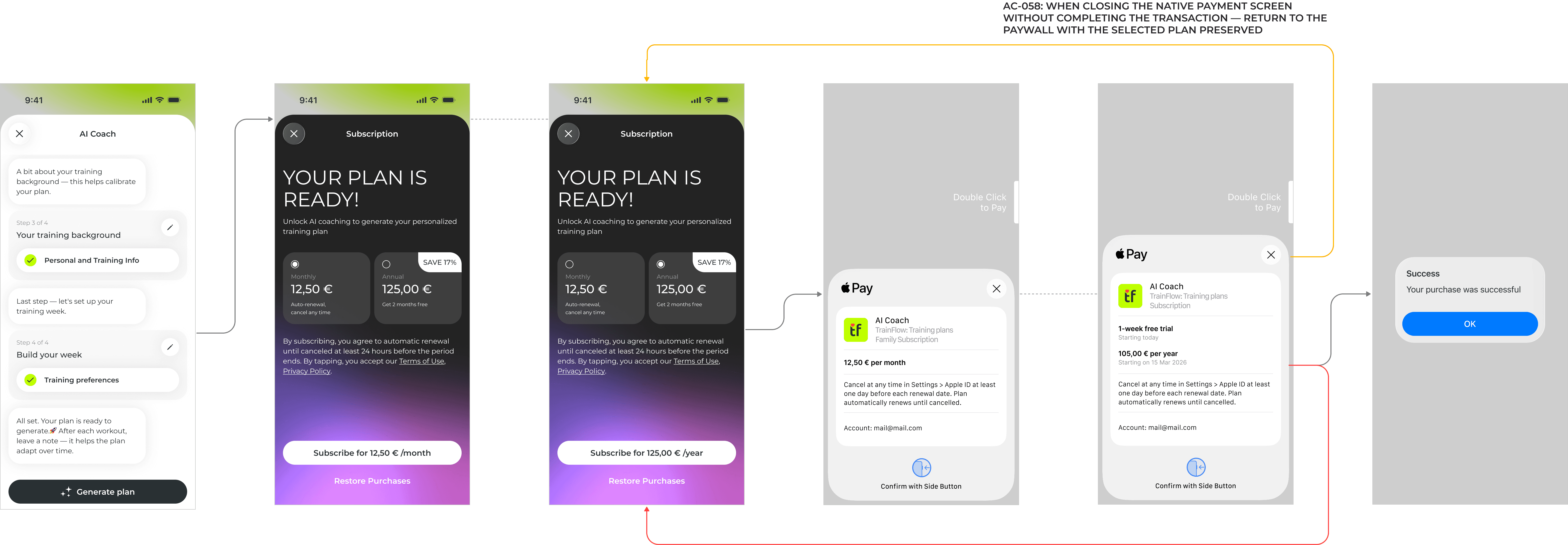
The paywall now appears after the athlete completes the survey. They choose Monthly or Annual, confirm through native Apple Pay, and land on a success screen.
Device connection: from a mandatory gate to an optional, self-aware step
The first version put a dedicated, mandatory "connect your watch" screen before the survey could even start. Anyone without a supported device, or anyone who just did not want to connect yet, was blocked from continuing.

Concept, not shipped. A hard gate before the survey. This cost us athletes without a watch, and frustrated everyone else who just wanted to explore the coach first.
I moved device connection to step 1 inside the survey, with three changes. If a watch is already connected elsewhere in the app, the step auto-detects and skips. If not, the app clearly shows what is linked before asking. A visible "Skip for now" lets someone continue without a device at all. I added the auto-detect after testing showed athletes got annoyed re-entering something the app already knew.

No hard gate. The app checks first, asks only if it has to, and never blocks the survey over it.
A questionnaire that knows nothing about you, until it does
The first version of goal selection was a single path: pick your race. There was no alternative for someone who just wants to start running or maintain their current volume.

Concept, not shipped. Race-only goal selection quietly excluded a meaningful share of the target audience: people training without a race on the calendar.
I split goal selection into three types: Race Prep, Start Running, and Stay Fit, after noticing in corridor testing that participants without an upcoming race simply abandoned the survey at that step. Each branch shapes the rest of the survey and the coach's ongoing logic differently.

Three paths instead of one. The survey adapts to what the athlete actually wants, not just to racers.
Training preferences: adding the metric that makes the plan work without a watch
The first version of Training Preferences captured daily hours, training days, location, and long-run day, but never asked for weekly running volume.

Concept, not shipped. Without a watch, the coach had no way to calibrate load. Even with one, a first-time user with no training history faced the same problem.
I added a Weekly Volume field after realizing the coach had no fallback for athletes without a watch or training history. This gap was not obvious until I walked through the no-device path myself.
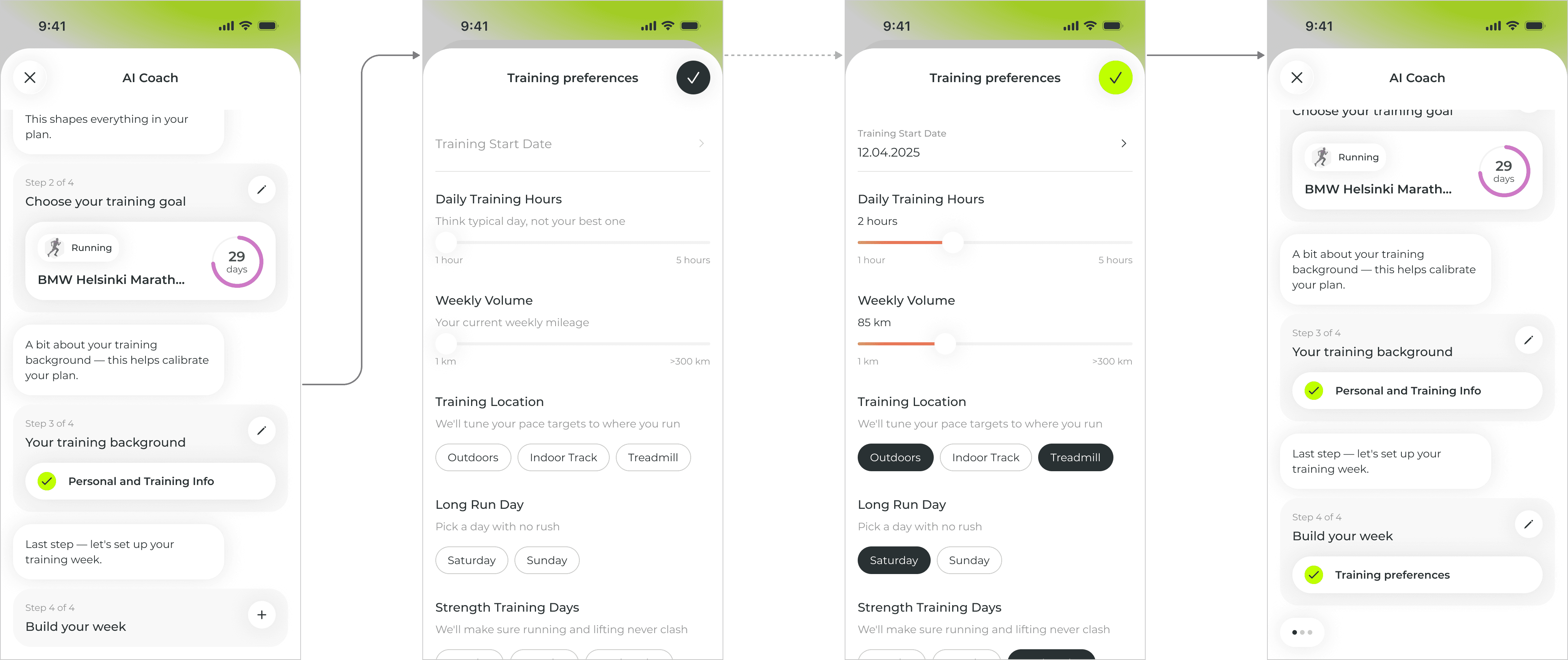
One number that works whether or not a watch is connected. The coach always has something to calibrate against.
Check-in: watch data plus the athlete's voice
The watch gives an objective picture: heart rate, pace, volume. Check-in adds the subjective one: RPE, how the athlete feels, and a short comment. The flow opens as a dialogue, not a form, so it feels like a conversation with a coach instead of a survey.

The coach opens with a question, the athlete answers freely, and confirming next week's plan takes one tap if nothing has changed.
If check-in is skipped entirely, the app auto-generates a summary so the plan still adapts.
The coach card: from dashboard widgets to a single surface
The AI coach did not start as a hidden chat thread. It started as a set of separate dashboard widgets: training volume, plan for today, and a small block confirming a coach existed and how to turn it off.
I combined the scattered widgets into one AI Coach card once it became clear we needed a single place for goal changes and disabling the coach. Splitting those actions across separate widgets would have meant repeating the same status logic three times.

The coach card's set of widgets changes depending on the athlete's goal.
Changing a goal and skipping check-in: two edge cases
Changing a goal. I introduced a 7-day cooldown with a 24-hour correction window, so a same-day fix does not use up the athlete's one change for the week.

Changing a goal opens a confirmation step before anything is touched. The current plan gets removed, completed workouts stay in history, and the athlete can still back out.
Deleting a goal with active coaching. I blocked deletion while a goal is actively tied to AI Coach, until the goal is changed first. The coach always needs a goal to plan against, so this is blocked at the UI level instead of becoming an undefined state in the backend.

Tapping Delete on the athlete's AI Coach goal does not delete it. It redirects to changing the goal instead.
"Your race is done," reworded into a real question
The first version of the post-race completion banner assumed success outright: "You did it! Your race is done. AI Coach is already planning your recovery. Ready for the next goal?"
I flagged the tone problem and worked with a UX writer to replace it with an open, neutral question asking how the race actually went, before offering to plan the next goal.
Re-onboarding after a goal is reached: steps kept, but pre-filled
We considered reducing repeat onboarding to a single step, just re-picking a goal. We rejected this, since enough could plausibly change between goals, like weight or training days, that skipping those steps risked building a plan on outdated data.
All steps remain, but they arrive pre-filled and marked complete. The athlete confirms rather than re-enters.
What stayed out of MVP scope
Running only. Multi-sport support is planned for later versions.
Weekly plan only. Real-time daily adjustments need different infrastructure.
After launch: what Mixpanel showed us, and what stayed out of scope
Post-release data showed the expected drop in check-in completion, from 61% in week one to 43% by week four. But the share of auto-generated plans was climbing starting in week three, a signal we had set up as a guardrail metric specifically for this.
The problem was not motivation. It was the entry point. An open-ended question works well early on, but by week four, people did not know what to write and just closed the screen.
I proposed a redesign: check-in in three layers. An RPE slider (one gesture, no text), quick categories (Sleep, Energy, Legs, Motivation), and an open field with a dynamic prompt built from that week's data. This is the next iteration, based on what the analytics showed after launch.
Analytics were built in before release, not after
I worked with analysts to design the event schema before the feature shipped. Every event carries context, like goal type, connected device, and entry point, so we can see not just the drop-off but which segment is leaving and why.
The key metric of the weekly cycle is the ratio of check-ins completed to skipped, by week. A steady climb in auto-generations from week three or four is a signal of fatigue with the dialogue, not with the training.
Team and process
We worked as a cross-functional team: iOS and Android developers, backend, QA, a UX writer, and a marketer. AI Coach touched more layers at once than the subscription did, so synchronization with development was tighter. Before release, I walked through the full flow myself and fixed several differences from the design before launch.
The platform should be on the athlete's side
Throughout the project, decisions were tested against one rule: the system should be on the athlete's side, not judging their discipline. Do not penalize a missed check-in. Do not assume a race went well. Do not force a rebuild of the whole profile just to set a new goal.